 SSLWatch
Simple pricing for SSL & domain monitoring
Start free with one website. Upgrade when you need more sites, earlier warnings or your whole team on board.
Free
$0/month
- Monitor 1 website
- SSL certificate & domain expiry dashboard, re-checked every 12 hours
- Certificate-expiry e-mails 30 and 3 days before (3-day alert marked CRITICAL)
- Calendar reminders (.ics)
- 🔒 Team members and Slack, Teams & Discord alerts Team plan only
Starter
$5/month
- Monitor up to 35 websites
- SSL certificate & domain expiry dashboard, re-checked every 12 hours
- Certificate-expiry e-mails 90, 30, 15 and 3 days before (3-day alert marked CRITICAL)
- Calendar reminders (.ics)
- Domain registration expiry alerts
- CSV export
- 🔒 Team members and Slack, Teams & Discord alerts Team plan only
Pro Most popular
$10/month
- Monitor up to 50 websites
- SSL certificate & domain expiry dashboard, re-checked every 12 hours
- Certificate-expiry e-mails 90, 30, 15 and 3 days before (3-day alert marked CRITICAL)
- Calendar reminders (.ics)
- Domain registration expiry alerts
- CSV export
- Certificate-change alerts
- Bulk import (paste or CSV file)
- Weekly report e-mail every Monday
- 🔒 Team members and Slack, Teams & Discord alerts Team plan only
Team
$20/month
- Monitor up to 100 websites
- SSL certificate & domain expiry dashboard, re-checked every 12 hours
- Certificate-expiry e-mails 90, 30, 15 and 3 days before (3-day alert marked CRITICAL)
- Calendar reminders (.ics)
- Domain registration expiry alerts
- CSV export
- Certificate-change alerts
- Bulk import (paste or CSV file)
- Weekly report e-mail every Monday
- Up to 10 team members sharing one dashboard Team plan only
- Slack, Microsoft Teams & Discord alerts Team plan only
Compare plans
| Feature | Free Free | Starter $5/mo | Pro $10/mo | Team $20/mo |
|---|---|---|---|---|
| Websites monitored | 1 | Up to 35 | Up to 50 | Up to 100 |
| SSL certificate expiry e-mail alerts | 30 & 3 days (3-day = CRITICAL) | 90, 30, 15 & 3 days (3-day = CRITICAL) | 90, 30, 15 & 3 days (3-day = CRITICAL) | 90, 30, 15 & 3 days (3-day = CRITICAL) |
| Calendar reminders (.ics) | ✓ | ✓ | ✓ | ✓ |
| Domain-registration expiry alerts All paid plans | — | ✓ | ✓ | ✓ |
| CSV export All paid plans | — | ✓ | ✓ | ✓ |
| Certificate-change alerts Pro & Team | — | — | ✓ | ✓ |
| Bulk import (paste or CSV file) Pro & Team | — | — | ✓ | ✓ |
| Weekly report e-mail (Mondays) Pro & Team | — | — | ✓ | ✓ |
| Team members (shared dashboard) Team plan only | — | — | — | Up to 10 |
| Slack, Microsoft Teams & Discord alerts Team plan only | — | — | — | ✓ |
Prices in US dollars, billed monthly through Stripe. Cancel any time. Taxes may apply. Already subscribed? Upgrade or switch plans from your Account page.
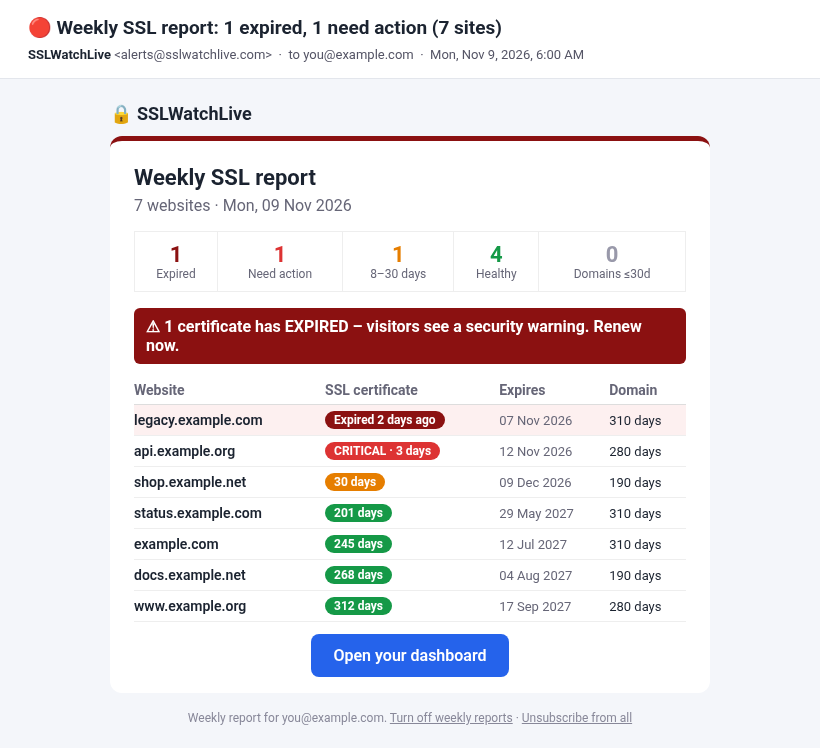
What the alert e-mails look like
Paid plans e-mail you 90, 30 and 15 days before a certificate expires, then a CRITICAL alert at 3 days (red, subject starts with “CRITICAL:”). Free accounts get the 30-day and CRITICAL 3-day e-mails. Pro and Team also get a Monday weekly report.
Connecting Slack, Teams or Discord (Team plan)
On the Team plan, open your dashboard → Alerts & integrations → Add or manage webhooks, paste an incoming-webhook URL and press Test. Where to get the URL:
- Slack: create an app at api.slack.com/apps → Incoming Webhooks → Add New Webhook to Workspace, pick the channel and copy the URL.
- Microsoft Teams: in the channel, open ••• → Workflows → Post to a channel when a webhook request is received, then copy the URL it gives you.
- Discord: Server Settings → Integrations → Webhooks → New Webhook → Copy Webhook URL.
Frequently asked questions
How do I connect Slack, Teams or Discord?
Chat alerts are on the Team plan. Open your dashboard, go to Alerts & integrations and choose Add or manage webhooks, then paste an incoming-webhook URL. Slack: create an app at api.slack.com/apps, turn on Incoming Webhooks and add one for your channel. Microsoft Teams: in the channel use Workflows → "Post to a channel when a webhook request is received". Discord: Server Settings → Integrations → Webhooks → New Webhook → Copy Webhook URL. Use the Test button to confirm it works.
Is the free plan really free?
Yes. Monitor one website with e-mail alerts, no credit card and no time limit.
When do alert e-mails go out?
Paid plans e-mail you 90, 30, 15 and 3 days before a certificate expires; Free e-mails at 30 and 3 days. The 3-day e-mail is marked CRITICAL (red, subject starts with "CRITICAL:"). You also get an e-mail if a certificate has expired or a site fails two checks in a row. See a sample alert e-mail on our sample page.
Which plan should I pick?
Starter covers up to 35 sites with 90/30/15/3-day warnings, domain-expiry alerts and CSV export. Pro adds certificate-change alerts, bulk import and a weekly report for up to 50 sites. Team covers 100 sites with shared logins and Slack, Teams or Discord alerts.
How do I pay?
Paid plans use Stripe's secure hosted checkout (card, Apple Pay or Google Pay). Your card details never touch our server.
Can I cancel any time?
Yes. Open Account → Manage billing to cancel in one click. You keep your plan until the end of the month you paid for.
What happens if I downgrade?
Nothing is deleted. Websites above your new plan's limit are paused until you upgrade again or remove some.
What do Team members get?
Each teammate logs in with their own e-mail and password, sees and manages the shared dashboard and receives the alerts. You can also send alerts to Slack, Microsoft Teams or Discord.